Web chat on your website
The agent that answers your phone, on your website. Chats land in the same inbox as your calls and texts.
Turn it on
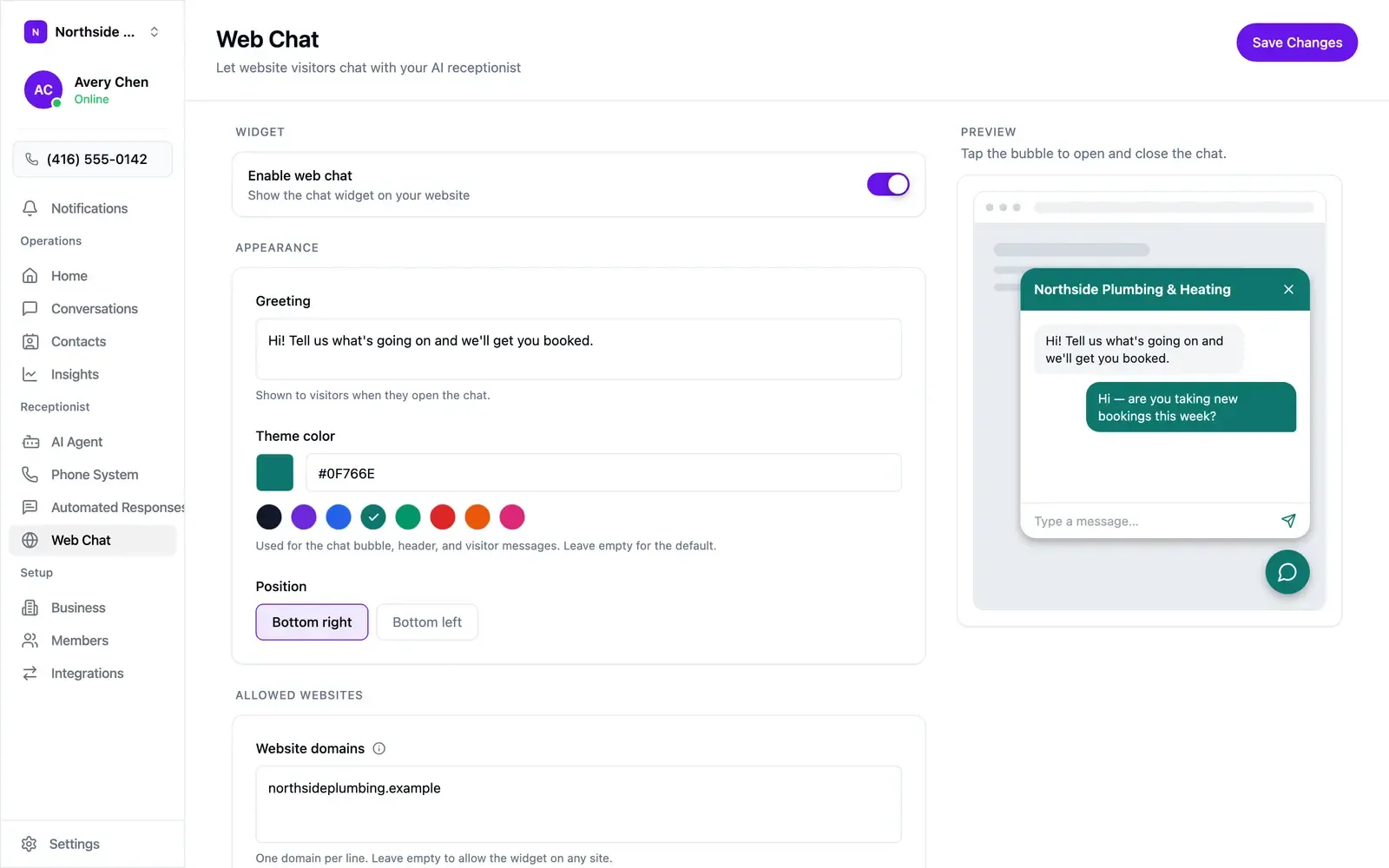
Section titled “Turn it on”- Open Web Chat in the sidebar and flip Enable web chat.
- Add the embed code to your site (below). The switch and the snippet are both required.
Turning the switch off later removes the bubble without touching the code.
Appearance
Section titled “Appearance”The preview updates as you type.
- Greeting — the first line in the panel when a visitor opens it. Written, so keep it to a line.
- Theme color — the bubble, the panel header, and the visitor’s own messages.
A preset or a hex value like
#0F766E. Empty falls back to near-black. - Position — bottom right or bottom left.
Allowed websites
Section titled “Allowed websites”Website domains lists the sites allowed to open chats with your widget. Your widget key sits in your page’s HTML where anyone can read it, so this list is what keeps it yours.
- One domain per line, bare:
northsideplumbing.example. wwwis covered automatically. Other subdomains need their own line, soshop.example.comis a second entry.- An empty box allows any site, which is worth doing only while testing.
Add it to your site
Section titled “Add it to your site”Copy the snippet under Embed code into your site’s HTML — most site builders have a “custom code” or “footer scripts” box, and anywhere on the page works:
<script async src="https://usecallspace.com/widget.js" data-widget-key="wck_..."></script>The widget draws itself in an isolated shadow root, so your site’s styling and the widget stay out of each other’s way.
What a visitor sees
Section titled “What a visitor sees”A bubble in the corner, opening to your greeting. A conversation starts on the first message they send, and is remembered in their browser, so a returning visitor picks the same thread up.
What the agent does
Section titled “What the agent does”The same knowledge, behaviour rules, and booking setup as on the phone, in writing:
- Replies run one to three plain sentences.
- A visitor arrives anonymous. Once the conversation has substance, the agent asks for a name and a phone number or email and saves them to the contact. Until then they show as Website visitor in your inbox.
- Requests for a person, pricing beyond what it knows, or anything it can’t help with get flagged for follow-up, and the visitor is told someone will be in touch.
- Visitors are limited to 30 messages an hour per conversation.
Taking over a chat
Section titled “Taking over a chat”Web chats appear in Conversations with a Web chat badge, and agent replies are labelled AI assistant. Everyone on the team is notified when a message arrives.
Reply from the composer as you would to a text, picking Web chat from the channel picker if the conversation has more than one channel. From the moment you send, the chat is yours for the rest of that visitor’s session. The next visitor gets the agent.
If the bubble doesn’t appear
Section titled “If the bubble doesn’t appear”- Enable web chat is on.
- The site is listed in Website domains, as the bare domain.
- The snippet on the page carries the
data-widget-keyfrom this screen.