Shopify integration
“Where’s my order?” answered by phone, with your live order data.
Most calls to a store ask the same few things: where is my order, can I change the address, do you have this in a medium. Callspace answers them by reading your live Shopify data. It identifies the caller from their number, pulls their orders, and makes the change if the order still allows it.
7-day free trial · 5-minute setup · Trained on your business · No contract
Ecommerce · Available now
What it does on a call.
- 01
Identifies the caller from their number
Orders are matched to the number the customer is calling from, so callers do not need an order number. If no customer matches, the AI says so and takes a message.
- 02
Order status and tracking
Fulfilment status, tracking, items, and shipping address for a specific order, read out on the call.
- 03
Changes the shipping address
While an order has not shipped, the AI can correct the address. It re-checks ownership, reads the full new address back, and waits for a yes before saving.
- 04
Cancels orders
Cancellation while the order is still cancellable, handled on the call instead of over a day of email.
- 05
Searches your product catalogue
Searches live products by name, keyword, or SKU, then reads back the description, price, and which variants, such as sizes and colours, are in stock.
- 06
Adds callers to your mailing list
Subscribes a caller to your Shopify email marketing list after they say yes and their email has been read back to them.
In Callspace
What you will see.
-
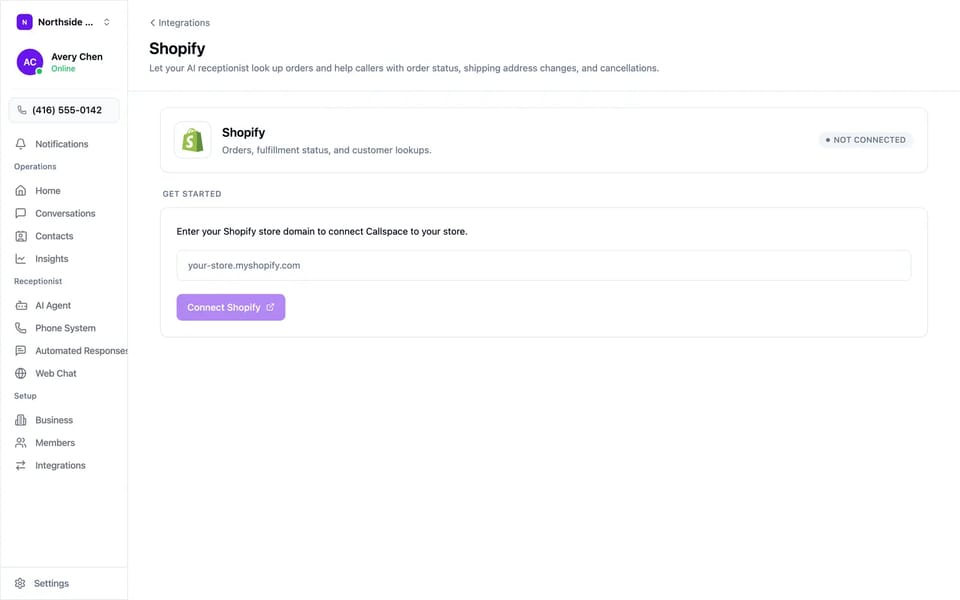
Enter your store domain and approve the app.
Use cases
When it earns its keep.
- The fifteenth “where is my order?” call of the day
- A customer who typed the wrong apartment number and calls before the order ships
- A change-of-mind cancellation at 8pm, after support has closed
- A shopper asking whether the medium is back in stock during a sale
- Black Friday week, when the support queue outgrows your team
Try it on your own line, free for 7 days.
Setup
How to turn it on.
- 01
Enter your store domain
Open Settings → Integrations → Shopify, type your myshopify.com domain (for example your-store.myshopify.com), and click Connect Shopify.
- 02
Approve the app in Shopify
Shopify lists exactly what Callspace is asking for. Approve it and you return to Callspace with the store connected.
- 03
Take calls
Order lookups, tracking, address changes, cancellations, and product search work on the next call. There is no separate toggle to switch on.
Before you start
- A Shopify store and an account that can install apps on it.
- Shopify runs alongside Jobber, Calendly, or Google Calendar, since only booking integrations conflict with each other.
FAQ
Questions we get asked.
How does it know which orders belong to the caller?
It matches the number they are calling from against your Shopify customers. If they call from a different number, the AI asks for the email or phone on the order before showing anything.
Can it change an address on an order that already shipped?
No. The AI checks whether the order is still editable and tells the caller when it is too late.
Will it subscribe people to marketing without asking?
No. It subscribes a caller only after they agree, and reads their email address back first.
Does it work with Shopify Plus and multiple stores?
It works with any Shopify plan. One store connects per Callspace organisation, so get in touch if you run several.
Does my team need to change how it handles orders?
No. Address changes and cancellations are made in Shopify, so they show up in your orders the same way as ones your team makes.
What happens if my store is briefly unreachable?
The AI tells the caller it cannot reach the store right now and offers to take a message.
More
Also connects to.

Put Shopify on the phone.
First 7 days free, then $150/month USD. Forward your line in about five minutes, and turn it off whenever you want.