Call Center Managers: Warm Transfers With SOPs, Scripts and AI
A practitioner guide for call center managers: SOPs, scripts and AI room participant architectures that automate context, improve handoffs, and reduce...
A warm transfer is an attended handoff: the transferring agent briefs the receiving agent on whom the caller is, what they need, and what’s already been tried, then connects them live. That briefing step is what separates it from a cold transfer, where the caller lands with a stranger who knows nothing. Done right, warm transfer cuts repeat explanations, calms frustrated callers, and lifts CSAT, but it requires a phone system built for consult calls, or an AI layer that carries context automatically.
TL;DR:
- Most warm transfers require a phone system with consult, hold, and three-way calling features; without these, reliable execution is impossible.
- Warm transfer reduces repeat contacts and frustration, especially for complex issues, high-value accounts, or sensitive topics, despite taking slightly more time upfront.
- Building a structured, briefed handoff protocol and measuring relevant metrics like repeat-context rate and CSAT are essential for effective implementation.
- AI-powered platforms, like Callspace, automate the context transfer process, providing real-time transcripts and structured summaries to improve accuracy and efficiency.
- Poor performance of warm transfer programs often stems from unstructured briefings, not agent training, emphasizing the need for standardized processes and proper instrumentation.
Table of Contents
- What Is a Warm Transfer Call, and How Does It Work?
- Warm Transfer vs Cold Transfer: When Speed Beats Context (and Vice Versa)
- When Should You Use a Warm Transfer? Decision Rules for Managers
- Warm Transfer Best Practices: The SOP Every Agent Should Follow
- Warm Transfer Scripts: What to Say During the Handoff
- Building Reliable Warm Transfers: Telephony, CRM, and AI Architecture
- Why Most Warm Transfer Programs Underperform
- How Callspace Handles the Context Problem for You
- Sources
- FAQ
What Is a Warm Transfer Call, and How Does It Work?
The mechanics are simple once you name them correctly. An agent assesses the call, decides it needs another set of hands, puts the caller on hold, and privately briefs the receiving party before making the introduction. Only then does the handoff happen, and the original agent exits.
Terminology gets muddled across vendors, so it helps to align your team on one vocabulary. “Warm transfer” is interchangeable with “attended transfer” or “consult transfer.” A “cold transfer” is the same as a “blind transfer” or a straight “refer,” where the caller gets moved with no advance notice to whoever picks up. Most business phone systems support this through a consult button that opens a private line to the second agent, a hold function for the caller, and three-way calling that lets the transferring agent join both parties before dropping off. If your platform lacks any of these three, you can’t reliably execute a warm handoff, according to Vonage’s breakdown of transfer types.
Warm Transfer vs Cold Transfer: When Speed Beats Context (and Vice Versa)
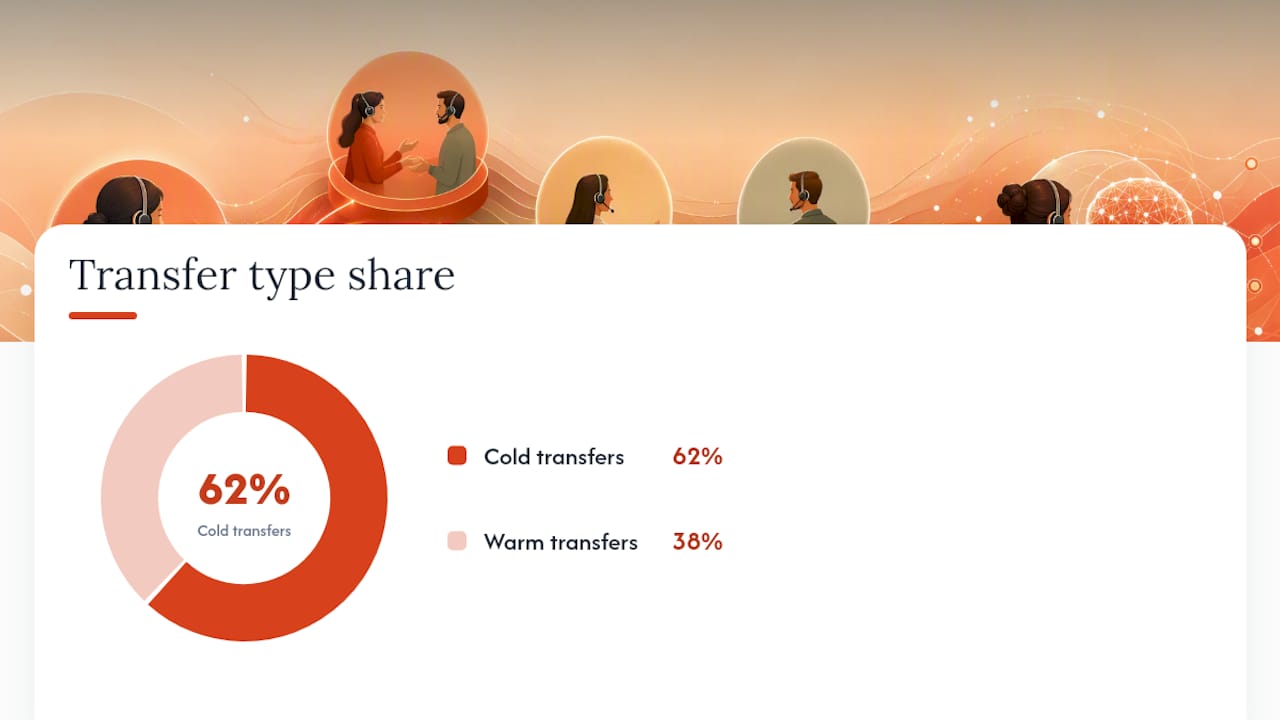
Cold transfer is faster. It skips the consult step entirely, so it costs the agent almost no extra time, and it looks efficient on a call log. But that speed comes at a price: the receiver has zero context, the caller repeats their story from scratch, and frustration compounds. Benchmarking on transfer patterns found that 62% of transfers industry wide are cold, and those cold handoffs produce larger CSAT penalties and higher repeat contact rates than warm ones.
Warm transfer costs more time up front, typically an extra short briefing, but that investment pays back in fewer repeat contacts and a caller who doesn’t feel bounced around.
Use warm transfer when:
- The issue is complex or has multiple moving parts (billing disputes, multi-step technical troubleshooting)
- The caller sounds upset, frustrated, or is escalating in tone
- The topic touches compliance, health information, or account security
- The caller is a known high-value account or has already been transferred once
Cold transfer is acceptable for simple routing, department redirects with no prior context to lose, or low-stakes internal handoffs where the caller has stated nothing sensitive yet.
When Should You Use a Warm Transfer? Decision Rules for Managers
Not every call needs the full consult treatment, and forcing warm transfer everywhere just slows your queue. Build explicit triggers instead of leaving it to agent judgment alone:
- Sentiment trigger. If sentiment analysis or agent instinct flags frustration or anger, route to warm transfer regardless of issue complexity.
- Complexity trigger. Multi-department issues (billing plus technical, insurance plus scheduling) almost always warrant a briefed handoff.
- VIP or regulatory trigger. Known high-value accounts, and anything touching health records or financial details, should default to warm transfer as policy, not preference.
- AI confidence trigger. If you’re running voice AI for first contact, set an escalation threshold below which the AI hands off warm rather than attempting resolution.
During volume spikes, warm transfer is the first thing to slip. Build a fallback: a shortened 15 second briefing template for peak hours, or a structured summary generated automatically so agents aren’t typing notes while a caller waits on hold.
Warm Transfer Best Practices: The SOP Every Agent Should Follow
Consistency is what turns warm transfer from a nice idea into a measurable operational habit. The steps below work as a laminated card at every agent’s desk.
Before the hold:
- Ask permission. Tell the caller you’d like to bring in a colleague and confirm they’re comfortable holding.
- Set a time expectation (“This will take about 30 seconds”).
The briefing itself, delivered to the receiving agent, should cover:
- Caller’s name and account or ticket ID
- The problem statement in one sentence
- What’s already been tried or discussed
- Caller’s current sentiment or emotional state
This four-point structure mirrors the warm transfer protocol Zoho Desk outlines as the standard for continuity, and it’s short enough to deliver in under a minute without sounding rushed.
Timing and tools: Keep the briefing to 30 to 60 seconds. Longer than that, and the caller starts wondering what’s taking so long. A CRM screen pop that auto-populates the receiving agent’s screen with account history removes a chunk of that verbal briefing burden, since the agent can scan the ticket while listening.
Metrics to track weekly:
- Average hold time during transfer
- Repeat-context rate (how often the caller has to re-explain something)
- CSAT delta between warm and cold transfers on comparable queues
Pro Tip: Train agents to brief in the order “who, what, tried, feels.” Name, issue, steps taken, emotional state. That fixed order keeps briefings under 30 seconds even for agents new to the process, because they’re not deciding what to say next, they’re just filling in a template they’ve memorized.
Warm Transfer Scripts: What to Say During the Handoff
Scripted language removes hesitation and keeps handoffs consistent across a whole team, especially useful during onboarding or role-play training.
- Permission and hold: “I’d like to loop in a specialist who can help with this faster. Can I put you on a brief hold, about 30 seconds, while I fill them in?”
- Briefing the receiving agent (kept to 20 to 30 seconds): “This is Maria calling about a billing discrepancy on invoice 4471. I’ve already confirmed the charge date and checked her account history. She’s a little frustrated because this is her second call about it.”
- Three-way introduction: “Maria, I have James here from billing who’s going to take this from here. James, Maria’s the one I just briefed you on.” Then exit cleanly: “I’ll let you two continue, thanks for your patience, Maria.”
- Emotional caller variant: Slow the pace slightly and lead with empathy in the briefing: “She’s upset, so I’d appreciate you acknowledging the wait before diving into the fix.”
For trainers, a role-play checklist should confirm: did the agent ask permission, was the briefing under 60 seconds, did all four briefing elements get covered, and did the exit feel natural rather than abrupt.
Building Reliable Warm Transfers: Telephony, CRM, and AI Architecture
Consistent warm transfer depends on infrastructure, not just agent discipline. At minimum, your phone system needs consult/attended transfer capability, presence indicators showing which colleagues are free, three-way calling, and a screen pop that pushes caller data to the receiving agent’s desktop the instant the call connects. Platforms like Twilio document these primitives directly in their Flex warm transfer guidance, and most modern cloud contact-center suites, per Capterra’s business VoIP category listings, now bundle them as standard rather than premium add-ons.
CRM integration matters just as much as the phone system itself. Look for automatic note logging on every transfer, transcript attachments tied to the ticket, and, where AI is involved, a tokenized handoff that passes a session identifier rather than forcing a manual re-entry of caller data.
AI-enabled architectures push this further with a room-participant model, where the AI functions as a peer inside the call rather than a separate system that has to hand off data through an API. Audio and structured context travel together, so a supervisor or human agent can join the same session without re-establishing who the caller is or what happened so far. A parallel process generates a structured summary while the call is still live, so it’s ready the instant a human joins. This pattern is also detailed in LiveKit’s agent-assisted transfer documentation. Pair this with accurate transcription, something tools like AmmarAI’s transcription platform specialize in, and the structured summary becomes far more reliable.
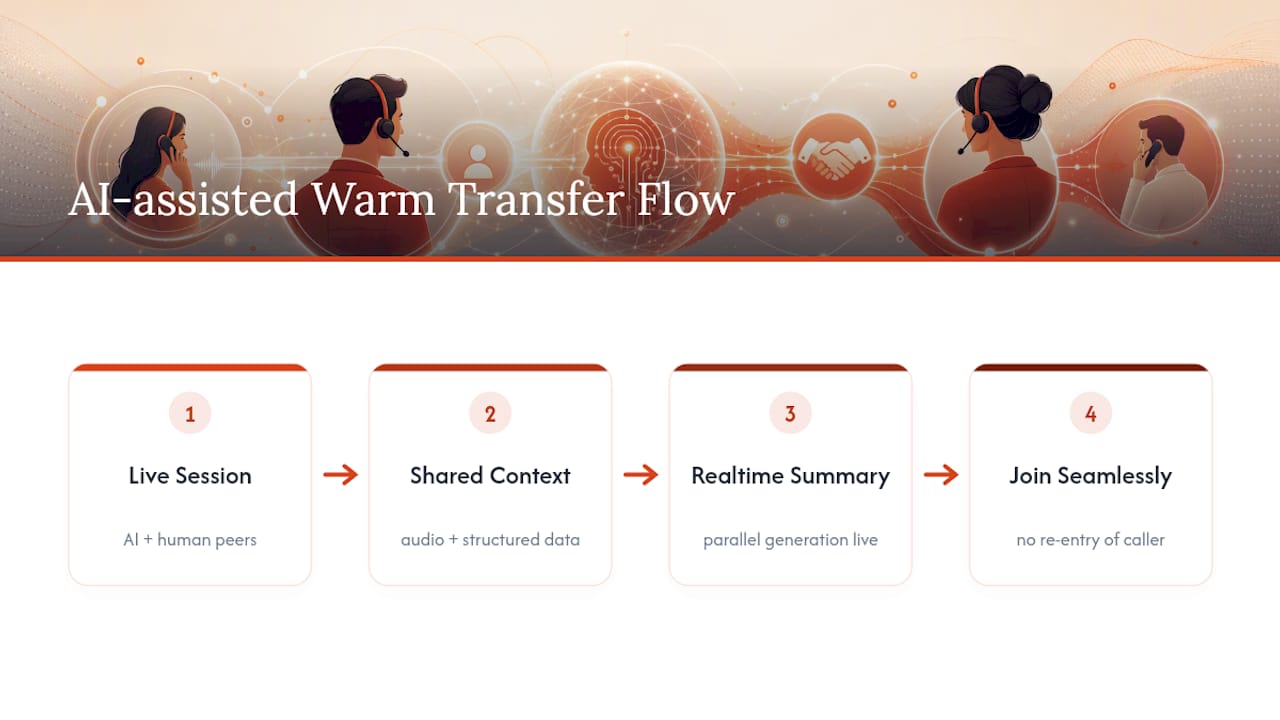
Whatever architecture you choose, instrument it. Track repeat-context rate, CSAT, and added handle time per transfer, and treat privacy review, especially around recorded transcripts, as a launch requirement, not an afterthought.
Why Most Warm Transfer Programs Underperform
Most managers assume warm transfer fails because agents skip the briefing. That’s rarely the real problem. It fails because the briefing has no structure, so agents either ramble for two minutes or blurt out three words and hope for the best. Neither serves the caller.
The fix isn’t more training hours, it’s a fixed briefing order agents can run on autopilot, paired with instrumentation that actually measures whether it’s working. Most contact centers track average handle time obsessively and ignore repeat-context rate entirely, which means they’re optimizing for the wrong number. A transfer that’s fast but forces the caller to repeat their issue has failed, even if it looks great on a handle-time report.
If you’re piloting anything here, run it as an actual experiment. Split comparable queues, one running structured warm transfer, one running your current process, and measure CSAT delta and repeat-contact rate over a few weeks before rolling out broadly. Small, measurable pilots beat sweeping policy changes every time, and they give you real numbers to defend the investment when someone asks why hold times ticked up.
— Sam
How Callspace Handles the Context Problem for You
Building a room-participant architecture in-house is a real engineering lift, which is why most call centers never get past the SOP stage. Callspace answers calls directly, transcribes in real time, and carries that structured context into the handoff automatically, so a human agent picks up a warm transfer already knowing the caller’s name, issue, and what’s been tried, without an agent spending 60 seconds relaying it manually. See how to set up transfer rules and departments in the Callspace docs.
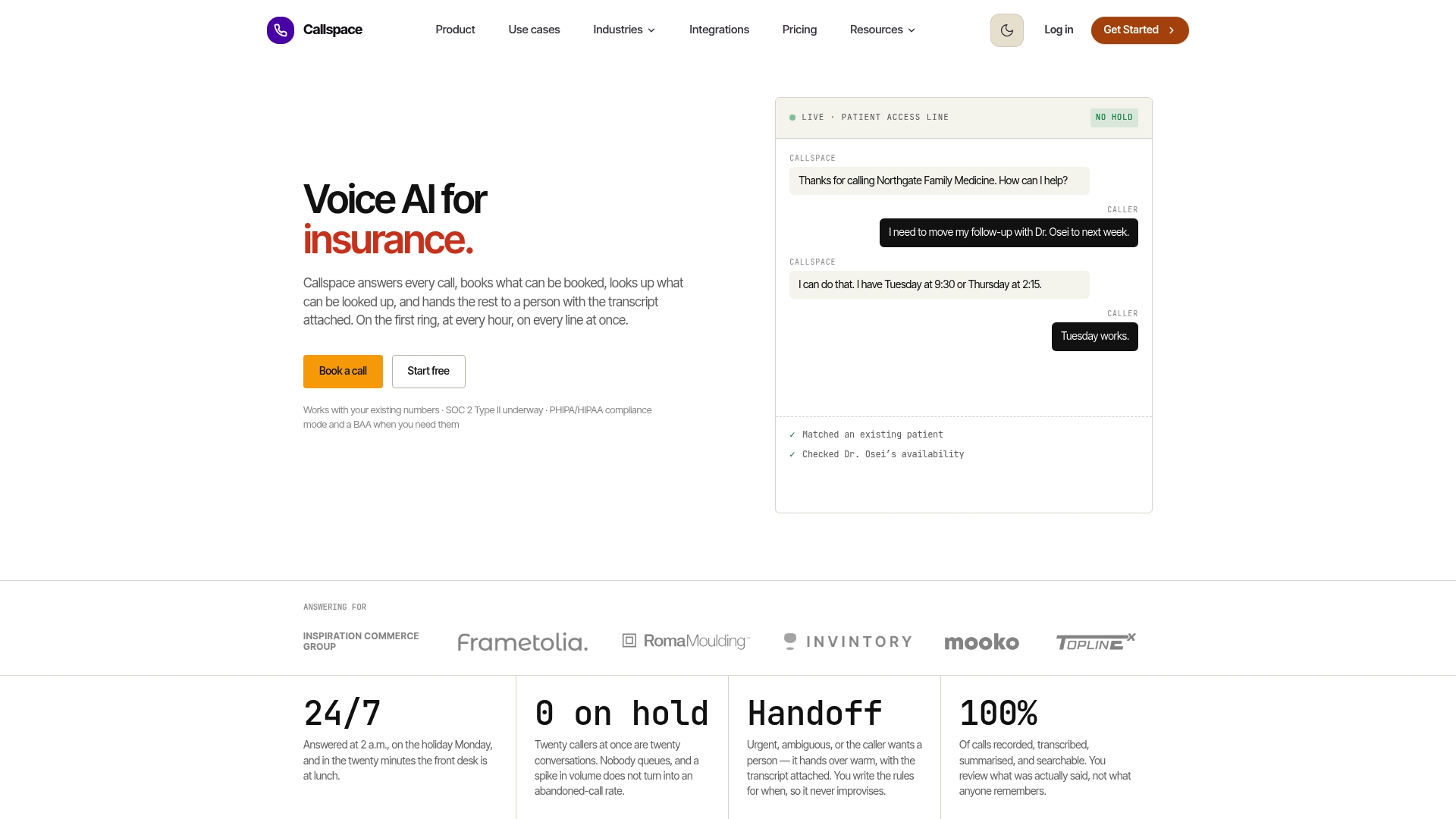
That matters most during overflow and after-hours coverage, when no agent is available to do the briefing themselves. Callspace’s 24/7 answering, appointment booking, and order lookup integrations mean routine calls get resolved without ever needing a transfer, and the complex ones arrive at your team already summarized. For healthcare and insurance operations specifically, Callspace’s compliance-oriented voice AI is built around exactly this handoff problem. If you run a general contact center, the call center-focused platform overview walks through how the context transfer works in practice. Explore the full product page to see a trial in action.
Sources
- Warm vs. Cold Transfer in AI Voice Agents
- Transfer Rate Statistics 2026
- Warm transfer protocol: Why it matters in customer service | Zoho Desk
- Warm Transfer vs. Cold Transfer: Definitions, Pros, Cons + More | Vonage
FAQ
What Does a Warm Transfer Mean?
A warm transfer means the transferring agent briefs the receiving agent on caller identity, issue, and context before connecting the call, so the caller never has to repeat themselves.
What Is the Difference Between a Warm Transfer and a Cold Transfer?
A warm transfer includes a private briefing before the handoff; a cold transfer, also called a blind transfer, connects the caller directly with no advance context shared.
Is Warm Transfer or Cold Transfer Better for Customer Satisfaction?
Warm transfer generally produces better CSAT and lower repeat-contact rates, since cold transfers make up roughly 62% of all transfers industry wide and carry a larger satisfaction penalty.
How Do You Do a Warm Transfer Step by Step?
Ask the caller’s permission, place them on a brief hold, privately brief the receiving agent on name, issue, steps tried, and sentiment, then make a three-way introduction before exiting the call.
Can AI Handle Warm Transfers to Human Agents?
Yes. Platforms using a room-participant model, including Callspace, generate a structured summary in real time and hand it to the human agent alongside the live call, replicating the manual briefing step automatically.