13-week clinic rollout: new-patient phone intake, 60–80% deflection
A four-phase, thirteen-week plan for automating new-patient phone intake at clinics — what to automate first, the EHR integration requirements, and the KPIs that prove it is working.

An AI-powered phone intake system works when your new-patient calls are mostly routine: scheduling, demographics, insurance basics. It needs a two-way connection to your EHR and clear rules for when a human takes over. Your first move isn’t buying software; it’s spending 14 to 30 days tagging your inbound calls by type and complexity, so you know exactly what you’d be automating before you automate it.
TL;DR:
- Up to 20-30% of clinics may not achieve full automation if their scheduling or intake processes are inconsistent before implementation.
- Automation is most effective for high-volume, low-complexity calls, which typically account for 60-80% of inbound calls in mature systems.
- A bi-directional EHR integration with field mapping and secure data handling is essential — simple calendar-only connections significantly limit automation benefits.
- The pilot phase should last around 13 weeks, starting with after-hours calls and gradually expanding to ensure process stability and KPI improvement.
- Staffing roles shift toward managing escalations and complex cases, with clear escalation triggers and quality checks to maintain patient experience.
Table of Contents
- What Types of New-Patient Calls Should You Automate?
- What KPIs Prove the Business Case for Phone Automation?
- What Are the Integration and Security Requirements?
- How Do You Roll Out Phone Intake Automation Step by Step?
- How Should Staffing and Escalation Roles Change?
- How Do You Protect Patient Experience During the Transition?
- What Fields and Questions Belong in a Phone Intake Script?
- Where Rollouts Actually Go Wrong
- Bring New-Patient Phone Intake to Your Front Desk With Callspace
- Sources
- FAQ
What Types of New-Patient Calls Should You Automate?
Picture your inbound calls sorted on two axes: volume and complexity. The calls worth automating first sit in the high-volume, low-complexity corner, the same segment Linear Health points to as delivering the fastest return. The calls that belong in the opposite corner, low-volume and high-complexity, are exactly where a scripted system breaks down and a human needs to be on the line.
Tasks that hand off cleanly to a new patient intake phone assistant include:
- Collecting name, date of birth, address, and contact details
- Booking routine appointment types with open availability
- Running basic insurance eligibility checks against payer data
- Answering FAQs about hours, location, parking, and what to bring
Tasks that still need a person, or at least a hybrid handoff, include clinical triage questions, scheduling across multiple providers with conflicting calendars, and anything touching prior authorization. Build escalation triggers into the call itself: a keyword like “pain,” a request to speak to a nurse, or three failed attempts to match a patient’s insurance record should all route to a live staff member without the caller having to ask twice.
What KPIs Prove the Business Case for Phone Automation?
Deflection rate, the share of calls fully resolved without a human, is the number that decides whether the pilot earns a permanent budget line. Mature deployments in healthcare settings typically land between 60% and 80% automated resolution, according to Linear Health’s decision guide, though most clinics reach only 50% to 70% within their first six months of live use.
60 to 80 percent of inbound call volume can be handled without a human once a voice AI deployment matures, based on Linear Health’s benchmark data.
Track four numbers weekly during a pilot: deflection rate, escalation rate, post-call patient satisfaction, and booking conversion. Add EHR write-back success, meaning the percentage of calls where patient data lands correctly in the chart without staff re-entry. A typical front-desk staffer fields 30 to 50 calls a day; if automation removes 20 of those, you’ve effectively freed up close to half an FTE’s daily capacity, real money even before you count reduced hold times.
What Are the Integration and Security Requirements?
None of this works without a bi-directional link to your practice management system. A one-way feed that only reads appointment slots but can’t write new patient records back into the chart just moves the manual data-entry problem instead of removing it, a gap Zocdoc’s operations guide flags as a common cause of failed rollouts.
Before you sign anything, confirm the system handles:
- Bi-directional EHR or practice management integration with mapped fields, not just a calendar overlay
- VoIP and calendar sync that supports screen pops and click-to-call for staff
- Encrypted transcription storage, defined retention periods, and recorded patient consent for call recording
- A fallback path, human or voicemail with guaranteed callback, for any call the system can’t finish
That last point matters more than most vendors admit. If a caller hangs up mid-intake, the system needs a rule for what happens next, not silence.
How Do You Roll Out Phone Intake Automation Step by Step?
A rushed rollout is how clinics end up automating a broken process instead of fixing it. Four phases, roughly thirteen weeks to first scale-up, keeps the project honest.
- Discovery and call categorization (weeks 1 to 3). Tag a sample of at least 200 to 300 inbound calls by type and complexity. The deliverable is a simple breakdown showing what percentage of your volume is genuinely automatable.
- Build and integrate (weeks 4 to 8). Configure field mapping to your EHR, write escalation rules, and train staff on the new call flow before a single live call touches the system.
- Pilot (weeks 9 to 12). Run the automated system in parallel with your existing process, starting with after-hours or overflow coverage rather than your busiest daytime line. Check metrics daily in week one, then move to weekly scorecards.
- Scale and optimize (week 13 and beyond). Expand call types gradually, tighten KPI targets, and set a recurring governance review, monthly at minimum, to catch drift before it becomes a pattern.
Pro Tip: Don’t let your first pilot touch your highest-volume line. Start on after-hours calls, where the stakes of a missed edge case are lower and your staff isn’t watching every call in real time.
How Should Staffing and Escalation Roles Change?
Automation doesn’t eliminate your front desk; it reorganizes what they do. Tier 1 shifts from answering every ring to reviewing automated transcripts and handling escalations. Tier 2 staff take the calls the system correctly flags as complex, prior authorization questions, multi-provider scheduling conflicts, insurance disputes. Tier 3, usually a clinical lead or office manager, handles anything involving patient safety judgment.
Skill-based routing means a new-patient scheduling question never lands on someone trained only for billing. When a warm transfer happens mid-call, the handoff script should take under fifteen seconds: patient name, reason for the call, and what’s already been collected, so the patient never has to repeat themselves.
- Sample 5% to 10% of automated calls weekly for a QA scorecard
- Score against three criteria: accuracy, tone, and correct escalation timing
Pro Tip: Give your Tier 2 staff a one-page reference of the top ten escalation reasons the system generates. It turns a vague “the AI keeps sending me weird calls” complaint into a fixable rule.
How Do You Protect Patient Experience During the Transition?
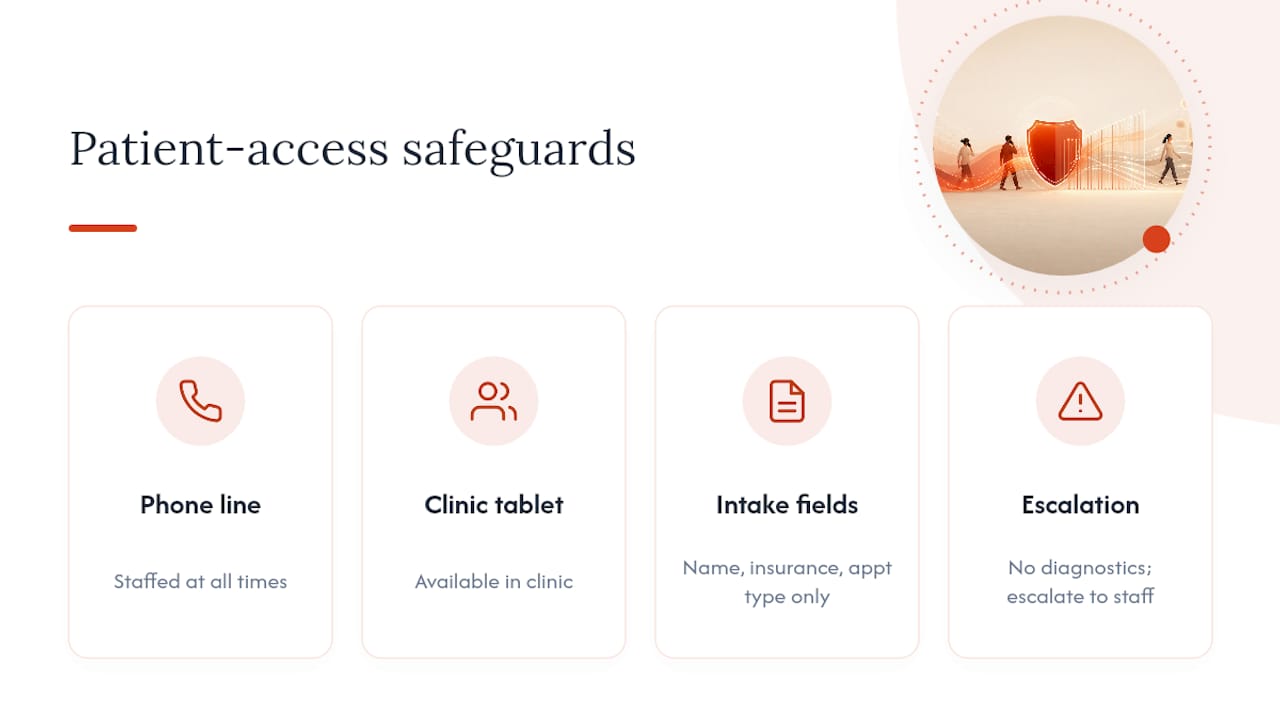
Keep a staffed phone line and an in-clinic tablet option available at all times, especially for older patients or anyone without reliable smartphone access. Conversational intake works best for administrative capture only, name, insurance, appointment type, never diagnostic advice, a boundary AIHealthcare360’s operations guide treats as a hard limit rather than a suggestion.
Offer language support beyond English wherever your patient population needs it, and always disclose that calls are recorded before intake begins.
What Fields and Questions Belong in a Phone Intake Script?
A phone intake questionnaire that runs past three minutes starts losing patients before you’ve even booked them. Keep it to eight questions or fewer, matched directly to fields your EHR expects.
| Data field | EHR mapping | Collected by |
|---|---|---|
| Full name, date of birth | Demographics | Automated |
| Insurance carrier and member ID | Eligibility module | Automated |
| Reason for visit (general category) | Appointment type | Automated |
| Referring provider, if any | Referral record | Automated or staff |
| Preferred appointment time | Scheduling | Automated |
| Symptom detail or urgency flag | Clinical notes | Staff (escalated) |
Routing logic should be simple: book automatically if insurance verifies and the requested appointment type is open; escalate if urgency language appears or insurance can’t be matched; collect copay information only after identity is confirmed. A clean handoff sounds like this: “This is Jane, transferring a new patient, Maria Lopez, insurance verified, requesting a Tuesday morning slot with Dr. Chen.”
Where Rollouts Actually Go Wrong
Automation mirrors whatever process you already have, broken rules included. If your scheduling logic is inconsistent before you automate it, you’ll just get inconsistency at higher speed. Fix the rules first, then pilot narrow, with daily checks in week one, because that’s when the edge cases surface, not after you’ve scaled to your whole call volume. Governance requires establishing clear scheduling pathways before booking automation goes live, not after.
Bring New-Patient Phone Intake to Your Front Desk With Callspace
Everything in this playbook, deflection tracking, EHR write-back, escalation rules, is what Callspace was built to run, not just theorize about. Callspace answers calls around the clock, transcribes them, and transfers complex cases to staff with context, reducing repetition.
This combination is particularly helpful during after-hours calls and peak booking times when many routine scheduling and demographic capture calls occur. Callspace integrates with calendars and practice management systems to ensure appointments and verified demographics are accessible to staff within their current workflows.
If you’re running the discovery phase from this guide, explore how Callspace fits your industry or look at the healthcare-specific deployment details to see how the integration and escalation rules described above translate into a live setup you can pilot in weeks, not quarters.
Sources
- Healthcare Call Center Automation: 2026 Decision Guide | Linear Health
- AI Patient Intake: Digital Check-In vs Paper Forms | AIHealthcare360
- Automated Patient Intake: Cut Pre-Visit Friction Fast | Zocdoc
- Ultimate Guide to Call Center Solutions for Clinics | MedicalClinicSolutions
FAQ
What Percentage of Calls Can AI Phone Intake Handle?
Mature deployments typically resolve 60% to 80% of inbound call volume without human involvement, though most clinics see 50% to 70% within the first six months, according to Linear Health.
Can AI Phone Systems Write Directly Into My EHR?
Only if the system has bi-directional integration; a one-way calendar sync without field mapping back to the chart just shifts data entry work rather than removing it.
Should New-Patient Phone Intake Handle Clinical Questions?
No. Conversational intake should stay limited to administrative data like demographics and scheduling, with clinical triage and complex cases escalated to staff.
How Long Does a Phone Intake Automation Pilot Take?
A typical rollout runs about thirteen weeks: three weeks for call categorization, five for build and integration, and four for a parallel pilot before scaling.
Does Callspace Handle New-Patient Intake Calls?
Yes. Callspace answers new-patient calls around the clock, captures demographics and scheduling details, and performs warm transfers with full context when a call needs staff attention.