Automate 70–80%: Medical Scheduling Automation For Clinics, 2026
Practical playbook for clinics to deploy medical scheduling automation: tiered self scheduling, voice AI phone recovery, and PHIPA safe pilot steps for 2026.
The most practical fix is a tiered self-scheduling model layered with a voice-AI phone system that catches what the web form misses. Clinics that pair the two often see fewer phone queues, lower no-show rates, and after-hours booking that doesn’t depend on a receptionist’s shift. Tools like voice-AI phone systems handle the phone layer, recovering callers who abandon a web flow or need a human-sounding answer at 9 p.m.
TL;DR:
- Voice-AI phone systems effectively capture patients who abandon online forms or call outside office hours, reducing missed bookings and phone queues.
- Operational benefits include freeing staff from repetitive calls, enabling after-hours booking, and automating telehealth link generation, with implementation tiers from callback automation to AI-driven eligibility checks.
- Proper vendor screening requires evidence of real-time data sync, robust security controls, and compliance with privacy laws like PHIPA, including detailed breach notification policies.
- Starting with pilot programs on limited sites and visit types helps identify workflow gaps and ensures measurement of metrics like booking conversion, no-shows, and call abandonment before full deployment.
Table of Contents
- Why Medical Scheduling Automation Matters Now
- What Features Does a Medical Scheduling System Need?
- Which Implementation Tier Fits Your Practice?
- How Do You Pilot Scheduling Automation Without Disrupting Care?
- What Are the PHIPA Obligations for Scheduling Vendors?
- What Implementers Wish They’d Known Sooner
- How Callspace Fills the Phone Gap in Your Scheduling Stack
- Sources
- FAQ
Why Medical Scheduling Automation Matters Now
Only about 26% to 27% of Canadian adults can get a same-day or next-day primary care appointment, according to CIHI’s 2024 data on shared health priorities. That gap is not just a patient complaint. It’s a scheduling capacity problem, and it’s exactly what medical scheduling automation is built to close.
A multisite case study covering nearly two million appointments found self-scheduling uptake climbed from about 4% to 15% of kept visits over two years, and self-scheduled patients missed appointments at a lower rate (2.7% versus 4.6%) than those booked the traditional way, per this uptake and outcomes analysis. Cancellations ran a bit higher for self-scheduled slots, but a canceled slot is far easier to backfill than a silent no-show.
Quick stat: Clinics using web-based scheduling systems saw measurable drops in no-shows and staff labor hours across a review of 36 studies, though cost and patient digital access remain real adoption barriers.
The operational wins compound:
- Front-desk staff spend less time on repetitive booking calls and more on complex cases.
- Patients book outside office hours instead of waiting for a callback.
- Telehealth links can generate automatically the moment a virtual visit type is selected.
What Features Does a Medical Scheduling System Need?
Not every scheduling tool on the market earns a place in a clinic’s workflow. Before signing anything, run the vendor through this checklist, drawn partly from feature guidance for healthcare scheduling platforms:
- EHR/EMR integration with real-time slot locking. The system must write directly into your practice management software so two patients can’t grab the same slot, and status changes sync both directions.
- Multi-channel booking. Patients should be able to book through a web portal, a patient app, or a phone call answered by voice AI, not just one channel.
- Automated multi-touch reminders. Text, email, and voice reminders at staggered intervals catch different patient preferences and habits.
- Waitlist and backfill logic. When a slot opens from a cancellation, the system should offer it automatically to the next eligible patient.
- Multi-provider and multi-location support. Visit-type rules need to flex by provider, by site, and by insurance or referral requirements.
- Security controls. Role-based access, audit logs, and encryption at rest and in transit are non-negotiable for any tool touching patient health information.
Pro Tip: Ask a vendor to show you their audit log screen during a demo, not just describe it. If they hesitate, that’s your answer on how seriously they treat access control.
Which Implementation Tier Fits Your Practice?
Scheduling automation isn’t one purchase decision. It’s a maturity ladder, and skipping a rung usually backfires.
Tier 1: Callback automation. This is the baseline: an automated system that logs a request and queues a callback. It reduces hold times but still relies on staff to close the loop. Conversion is modest because the patient hasn’t actually booked anything yet.
Tier 2: EHR-native self-scheduling. Patients pick a real slot that writes directly into the practice management system. Conversion here typically runs in a range indicating moderate to high performance once integration and template hygiene are solid, based on tiered performance benchmarks from industry practitioner analysis. This tier should handle your routine visit types, which constitute a large majority of daily volume: follow-ups, refills, standard checkups.
Tier 3: Intelligent scheduling. This layer adds eligibility checks, insurance verification, and predictive no-show modeling, an approach supported by research into AI-driven optimization for hospital appointment scheduling. Well-configured Tier 3 systems can push conversion into a high-performance range above that of Tier 2.
Voice AI earns its keep across all three tiers, but especially at the edges:
- It answers the phone-first patient who never touches the web form.
- It completes a booking someone abandoned halfway through an online flow.
- It handles nuanced eligibility questions (“Is my referral still valid?”) that a rigid web form can’t parse.
How Do You Pilot Scheduling Automation Without Disrupting Care?
Running a pilot beats a full rollout every time, because it exposes template problems and staff workflow gaps before they scale across every provider in your clinic.
- Pick one site and a narrow set of visit types. Start with routine follow-ups or standard checkups, the volume that fits the 70% to 80% automation rule.
- Set success metrics before launch. Track booking conversion, no-show rate, call abandonment, and average time-to-appointment.
- Clean your EHR templates first. Messy scheduling templates are one of the most common blockers to advanced self-scheduling working correctly.
- Train staff on escalation paths. Someone needs to own what happens when automation can’t resolve a booking, not just when it succeeds.
- Communicate the change to patients through signage, portal messages, and a scripted line for phone staff to explain the new option.
| Pilot Element | What To Track | Why It Matters |
|---|---|---|
| Booking conversion | % of attempts that complete | Shows whether the flow actually works for patients |
| No-show rate | Missed vs. kept appointments | Core measure of access improvement |
| Call abandonment | Dropped calls during peak hours | Flags phone capacity gaps automation should fix |
| Staff time on booking | Hours per week on scheduling calls | Measures the labor savings claim directly |
Pro Tip: Run your pilot for a full billing cycle, not two weeks. Scheduling behavior shifts around insurance renewal dates and seasonal illness spikes, so a short window will lie to you.
Watch for red flags during vendor evaluation: vague answers about where patient data lives, no clear breach notification process, or an integration that requires manual data exports instead of a real-time sync. Any of those should stall a contract until resolved.

What Are the PHIPA Obligations for Scheduling Vendors?
Under Ontario’s Personal Health Information Protection Act, the custodian, meaning your clinic, stays accountable even after a third-party vendor touches patient data. That responsibility doesn’t transfer just because a company sells the software, according to privacy guidance for small health care organizations.
Before signing with any scheduling or voice-AI vendor, require:
- A completed privacy impact assessment (PIA) covering how patient data flows through the system.
- A threat risk assessment (TRA) identifying where breaches could originate.
- Contractual breach notification timelines, spelled out in hours or days, not “promptly.”
- Limited data use clauses that restrict the vendor from repurposing patient information for anything beyond the contracted service.
- Audit rights letting your clinic verify compliance rather than take it on faith.
Roughly a quarter of Canadian adults still struggle to get timely primary care access, which raises the stakes on getting these contracts right the first time rather than renegotiating after a breach.
Beyond the paperwork, build in operational habits: log patient consent for automated communications, monitor any algorithm-driven scheduling decisions for bias or error patterns, and schedule periodic reassessments rather than treating the initial PIA as a one-time box to check.
What Implementers Wish They’d Known Sooner
Clinics that over-automate lose patient trust fast. The clinics that succeed automate the routine 70% to 80% of visit types and keep a human in the loop for anything urgent or ambiguous. Start with one visit type, one site, and real conversion numbers before scaling. A voice-AI layer built for healthcare compliance, with instant answering and full transcription, catches the calls a web form was never going to win anyway.
— Sam
How Callspace Fills the Phone Gap in Your Scheduling Stack
Every checklist item in this guide points to one weak spot most clinics haven’t closed: the phone. An AI-powered system answers every call instantly, with no hold music and no queue, then books the appointment, checks an order status, or hands off a complex case to your staff with a full transcript already attached. That warm handoff matters most during the exact hours your front desk can’t cover, evenings, lunch breaks, and weekends, when a missed call often becomes a missed patient.
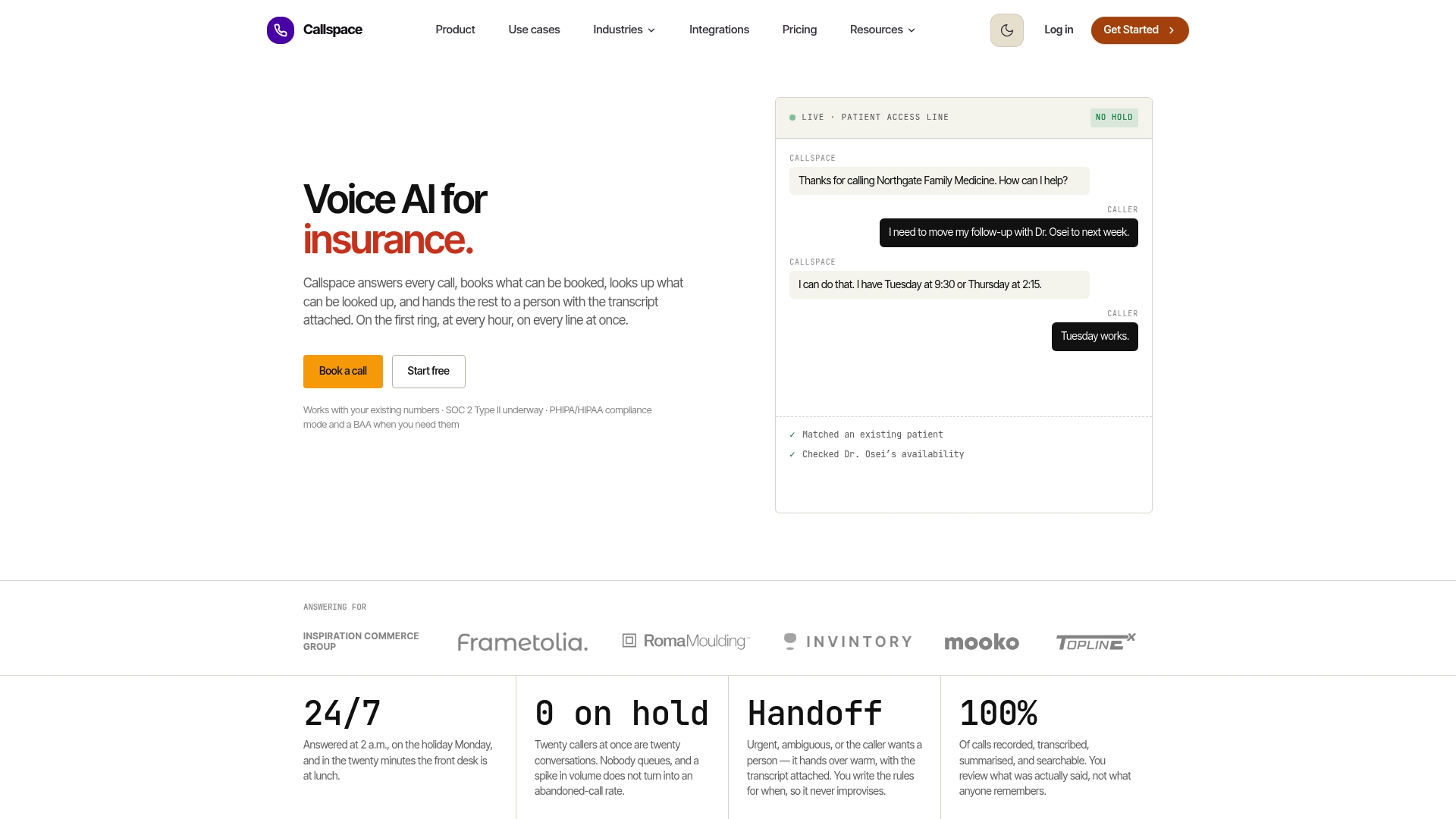
If your clinic is losing bookings because staff can’t answer every ring during the morning rush, the fix isn’t hiring more reception staff. It’s adding a phone layer that never puts anyone on hold. Such AI phone systems run 24/7, transcribe calls for quality review, and are built with healthcare compliance in mind, fitting into Tier 2 or Tier 3 setups without replacing your EHR-native booking flow. Check the Basic and Team plans or visit the healthcare-focused product page to see how the integration works for a clinic your size, and start a trial to see your call abandonment numbers before and after.
This article is general information, not a substitute for advice from a qualified doctor. Consult a qualified healthcare professional about your own circumstances before acting on anything here.
Sources
- CIHI — Taking the pulse: measuring shared priorities for Canadian health care (primary care access)
- Automated self-scheduling case study — uptake and outcomes
- A privacy management handbook for small health care organizations (IPC)
FAQ
What Is Medical Scheduling Automation?
Medical scheduling automation is software and voice systems that let patients book, reschedule, or cancel appointments without a staff member manually managing every call or form. It typically combines a self-service booking portal with automated reminders and, increasingly, a voice-AI phone layer like Callspace for calls that don’t fit a web flow.
Does Scheduling Automation Actually Reduce No-Shows?
Yes. A large multisite case study found self-scheduled appointments had a missed-appointment rate of 2.7% compared to 4.6% for traditionally booked visits, based on analysis of nearly two million appointments. Cancellations run a bit higher for self-scheduled slots, but canceled slots are easier to backfill than silent no-shows.
Is Patient Data Safe With an Automated Scheduling Vendor?
Custodians remain accountable for patient data under PHIPA even when a third-party vendor handles scheduling or phone calls, so contracts need clear breach notification terms and audit rights, per privacy guidance for health care organizations. Ask any vendor, including a voice-AI provider, to show a completed privacy impact assessment before signing.
Should a Small Clinic Start With Web Scheduling or Voice AI First?
Most clinics get the fastest return by running both together rather than sequentially: web self-scheduling handles routine bookings, while a voice-AI layer catches phone-first patients and abandoned online bookings. Piloting on one visit type at one site, as described in the pilot plan above, lets you measure conversion before expanding either channel.
How Much Does Voice-AI Scheduling Software Cost?
Callspace’s Basic plan runs $150 per month, with a Team plan available for practices needing more coverage, priced on request. Current pricing details are listed on the Callspace site rather than fixed in a printed rate card, since plans can be adjusted to a clinic’s call volume.