Calendar Integration Scheduling That Actually Prevents Double Bookings
Implementation-first calendar integration scheduling: make your scheduler the source of truth, use two way webhooks, and run a manual block test to stop...
The fix for calendar integration scheduling is architectural, not cosmetic: treat your scheduling system as the single source of truth, and connect Google Calendar or Outlook as two-way projections that mirror confirmed bookings out and pull busy time in. Get that hierarchy right and double-bookings drop close to zero, confirmations go out automatically, and your front desk stops babysitting two calendars by hand. Start today with a manual block test: put a hold on your calendar and confirm your scheduler refuses to offer that slot within seconds.
TL;DR:
- Accurate calendar integration relies on a true two-way sync with busy-time import, not just one-way push or simple polling, to prevent double-bookings effectively.
- Maintaining an authoritative scheduling database and regularly testing webhook renewals are essential to avoid sync failures that lead to conflicts or missed appointments.
- Proper setup includes validating buffer and lead-time rules, handling time zones correctly, and conducting manual block tests before going live to catch potential issues.
- CRM-native scheduling and webhook integrations require ongoing maintenance for expiration and renewal to ensure real-time accuracy and avoid stale data.
- Phone call bookings can be integrated using AI assistants that push confirmed slots immediately into the system, reducing gaps between call and schedule confirmation.
Table of Contents
- How Calendar Integration Scheduling Actually Works
- What Features Actually Prevent Double-Bookings?
- Which Integration Architecture Fits Your Setup?
- How Do You Set Up Calendar Sync Without Creating Conflicts?
- Why Do Calendars Still Get Out of Sync?
- Where Phone Bookings Fit Into the Sync Picture
- What Most Scheduling Advice Gets Backward
- A Faster Path From Phone Call to Confirmed Booking
- Sources
- FAQ
How Calendar Integration Scheduling Actually Works
Most confusion around calendar integration scheduling comes from mixing up three very different sync models. When you separate them, the engineering decisions get a lot easier.
One-way push sends confirmed bookings from your scheduler into a calendar and stops there. Your scheduling tool creates the event, but if someone edits or deletes it directly in Google Calendar, your system never finds out. This works fine for simple confirmation emails but it is a poor fit for anything with real conflict risk.
iCal pull works in the opposite direction. Your scheduler periodically fetches an .ics feed from an external calendar to check for busy time. It is simple to set up and works with almost any calendar platform, but it runs on a polling interval, not a live connection, so there is always a lag between something changing on the external calendar and your scheduler noticing.
Webhook-based two-way sync is the real answer for scheduling with Google Calendar or scheduling with Outlook Calendar at any serious volume. Your scheduler pushes confirmed bookings out immediately, and Google or Microsoft pushes a notification back the moment something changes on their side, so both systems stay close to current in near real time.
The concept tying all three together is authoritative availability. Your scheduling database, not the calendar app, should own the actual state of a slot. External calendars should be treated as projections rather than sources of truth because calendar services are eventually consistent. A write to Google Calendar does not guarantee every connected client sees it instantly, and if your scheduler trusts that state blindly, you get race conditions.
Three technical realities shape what is actually possible here:
- OAuth governs calendar access for both Google and Microsoft, and tokens expire or get revoked, so your integration needs a refresh flow, not a one-time connection.
- Google’s push notifications (webhooks) expire on a rolling window and must be renewed, or your sync silently goes stale without an obvious error.
- Polling trades simplicity for latency: the longer your interval, the more your booking page can display availability that no longer exists.
Get these three right and calendar integration phone booking, web-based booking pages, and manual staff scheduling can all pull from the same authoritative source without contradicting each other.
What Features Actually Prevent Double-Bookings?
Not every scheduling tool that claims “calendar sync” earns the label. Some of the best-known booking widgets embedded in WordPress sites offer real two-way behavior; plenty of cheaper tools only offer one-way push dressed up as integration. Before you commit to any scheduling tools integration, confirm the vendor supports these:
- True two-way sync with busy-time import. The tool should pull existing events from your calendar and block those times automatically, not just push its own bookings outward.
- Configurable buffer and lead-time rules. A 15-minute buffer between appointments and a minimum notice window (say, two hours) stop back-to-back bookings and last-second scheduling chaos.
- Automatic time zone and daylight saving handling. The system should store times in UTC internally and convert for display, so a client in a different zone never books the wrong hour.
- Meeting-link injection. For virtual appointments, the confirmation should auto-generate and embed a video link without a human touching it.
- CRM and webhook support. The scheduler should be able to notify other systems, or receive updates from them, the moment a booking changes.
- Structured reminder sequences. A confirmation immediately, a reminder at 24 hours, and a final nudge at two hours is a pattern with documented results: structured reminder sequences measurably reduce missed appointments in clinical and service settings alike.
- Payment or deposit collection at booking. For services where no-shows carry a real cost, this filters out low-intent bookings before they hit the calendar.
- An audit log. Every reschedule, cancellation, and sync event should be timestamped and retrievable when a client disputes what they booked.
Pro Tip: Ask any vendor demo to show you what happens when you manually delete a booked event from Google Calendar. If their system doesn’t detect the deletion and free the slot, you’ve found a one-way integration wearing a two-way label.
Teams managing shared calendars across multiple staff members should weigh team calendar management features specifically. A single-provider booking page is a different problem than routing appointments across six technicians with overlapping availability windows.
Which Integration Architecture Fits Your Setup?
Three realistic patterns exist for connecting a scheduler to Google Calendar, Outlook, or Apple Calendar, and each comes with a different failure mode.
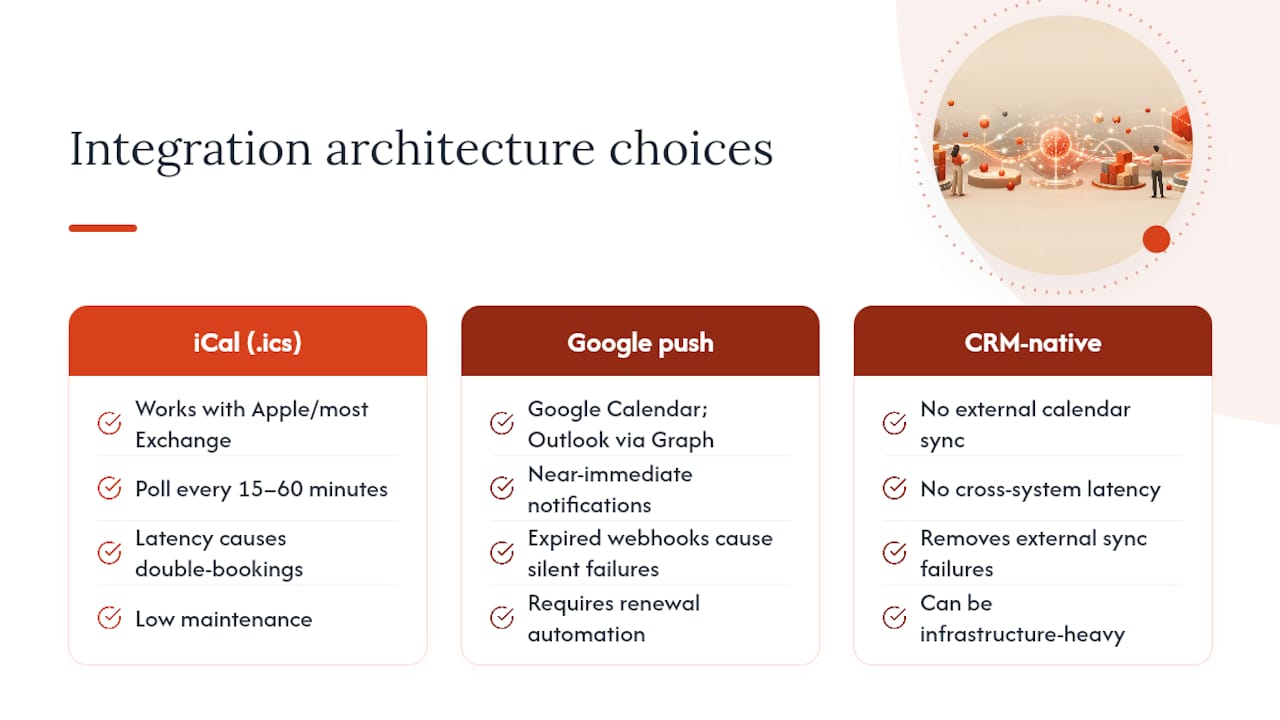
The iCal feed is the simplest route. You publish or subscribe to an .ics link, and your scheduler polls it on a fixed interval, commonly every 15 to 60 minutes. It works with nearly any calendar platform, including Apple Calendar and most Exchange configurations, which makes it a reasonable fallback when a platform lacks a native API. The tradeoff is latency: anything booked or canceled between polls is invisible until the next cycle runs, which is exactly the gap that produces a double-booking.
Google push (webhook) integration solves the latency problem but adds maintenance overhead. Once your scheduler establishes a webhook channel through the Google Calendar API, Google notifies your server almost immediately when a watched calendar changes. The catch, as noted in system-design guidance on webhook renewal and event tracking, is that these channels expire and must be renewed before the window closes, and developer notes on scheduling add-on behavior confirm this renewal cycle is a common source of silent sync failure when it is not automated. Outlook’s equivalent uses Microsoft Graph subscriptions with a similar renewal requirement. For a deeper technical comparison of when a webhook beats a polling API, a breakdown of webhook versus API trade-offs is worth reading before you commit engineering time.
CRM-native scheduling skips external calendar sync almost entirely by keeping scheduling logic inside the CRM itself. This approach removes a whole category of sync failures because there is no external system to reconcile against. It fits large sales or enterprise operations well, but for a solo provider or small clinic, it is often more infrastructure than the problem requires.
The safest default for most practices: keep your own scheduling database authoritative, push confirmed bookings out to Google or Outlook, and import busy time from those calendars as a read-only safety check rather than a second source of truth.
How Do You Set Up Calendar Sync Without Creating Conflicts?
Getting digital calendar sync right on the first attempt takes less time than fixing a double-booking after a client has already shown up angry. Work through these steps in order.
- Map your current workflow first. Write down every place an appointment can currently be created: front desk, website form, phone call, walk-in. Decide which system becomes authoritative before connecting anything.
- Connect Google Calendar or Outlook via OAuth. Authorize the connection with an account that has permission to both read and write events, then confirm the busy-time import is switched on, not just the outbound push.
- Set your buffer and lead-time rules before going live. A 10 to 15 minute buffer between bookings and a minimum lead time of one to two hours catches most last-minute scheduling collisions.
- Run a sandbox test suite before real clients touch it. At minimum: a manual block test (create an event directly on the calendar and confirm the scheduler blocks it), a create/cancel/reschedule cycle, and a simulated webhook expiry to see how the system behaves when sync goes stale. A short, repeatable test suite built around exactly these four scenarios catches the majority of integration errors before customers ever see them.
- Monitor closely for the first two weeks. Set up alerting for webhook failures and sync gaps, and check daily that reminders and meeting links are populating within minutes of booking, not hours.
The first two weeks after launch matter more than the setup itself. Implementation guidance on scheduling rollouts consistently points to an initial monitoring window as the period where sync delays, duplicate records, and reminder failures actually surface, since most of these issues only appear under real booking volume, not in a clean sandbox test.
Why Do Calendars Still Get Out of Sync?
Even a well-built calendar integration phone booking system will occasionally throw an error, and most of them trace back to one of a handful of causes.
- Race conditions from simultaneous bookings. Two people click “confirm” on the same slot within milliseconds of each other. The fix is optimistic locking: the system checks the slot is still open at the exact moment of the atomic write and rejects the second request instead of silently overwriting the first.
- Time zone display errors. Store every timestamp in UTC internally and convert to the client’s local zone only for display. Systems that store local time directly are the ones that break every March and November when daylight saving shifts the clock.
- Expired or unrenewed webhooks. Google’s push channels and Microsoft Graph subscriptions both expire on a schedule. If your system does not automatically renew them, sync goes quietly stale, and nobody notices until a double-booking happens.
- Permission scope failures. If the OAuth connection only grants read access, busy-time import will silently fail, or if the account used to authorize lacks calendar sharing permissions, the whole integration looks connected while doing nothing.
Pro Tip: When a client swears they never got a confirmation email, check the audit log before assuming the reminder system failed. More often, the booking was created with the wrong time zone offset and the confirmation went out for the wrong hour entirely.
Tracking Google’s googleEventId alongside a private extended property on each booking record gives you a reliable way to reconcile events during webhook updates, which matters most when a sync gap has already caused a mismatch and someone has to manually untangle it.
Where Phone Bookings Fit Into the Sync Picture
A lot of scheduling gaps don’t start online at all. They start when someone calls, gets voicemail, and books somewhere else. An AI phone assistant can take the booking details on the call and push a confirmed slot straight into your authoritative scheduler, using the same two-way sync logic already covering your web bookings.
Real-time transcription during the call matters here for a specific reason:
- It captures exact details (appointment type, preferred time, special requests) without a staff member scribbling notes mid-call.
- Context transfer means a human agent picking up a complex case sees the full conversation history instead of starting from zero.
- Booking creation happens at the moment of the call, which closes the gap between “customer wants an appointment” and “appointment exists in the system.”
This is the same logic that governs calendar integration for property managers fielding maintenance requests around the clock, or scheduling teams juggling appointment types across multiple service lines.
What Most Scheduling Advice Gets Backward
Most guidance on this topic treats calendar sync as a feature checkbox: does the tool “integrate with Google Calendar,” yes or no. That framing misses the actual failure point, which is almost never the connection itself. It is what happens during the seconds a race condition opens, or the days a webhook sits expired without anyone noticing.
The uncomfortable truth is that a lot of double-booking incidents are self-inflicted by teams who trusted their calendar app as the source of truth instead of their scheduler. Google Calendar and Outlook are excellent projections of availability. They are not built to arbitrate conflicting claims on the same slot, and expecting them to is where the trouble starts.
If you take one thing from this guide, prioritize the boring part: run the manual block test before launch, and check your webhook renewal logic before you check anything else. The flashy features (branded booking pages, custom reminder copy) matter far less than whether your system correctly refuses a double-booked slot at 4:58 PM on a Friday.
— Sam
A Faster Path From Phone Call to Confirmed Booking
Some AI phone assistants can close the gap where many scheduling systems still leak appointments: the phone call that goes to voicemail while your calendar sits open. Instead of a missed call becoming a missed booking, such systems answer instantly, collect the details, and push the confirmed appointment into your scheduling system using two-way sync principles, so the slot disappears from availability the moment it is taken.
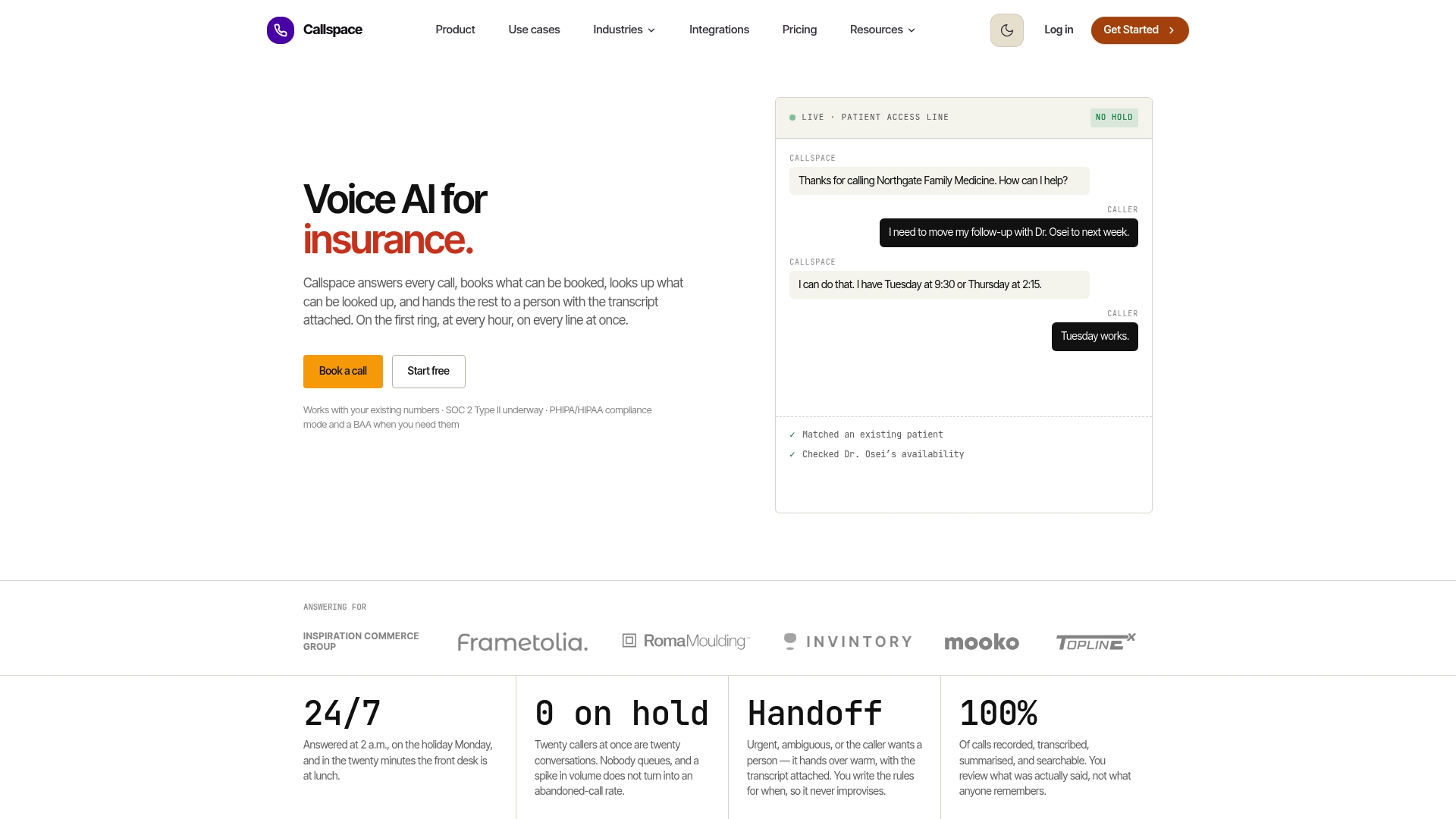
For healthcare practices, insurance offices, and e-commerce operations, this means fewer double-bookings from parallel phone and online requests, faster confirmations without a staff member relaying details by hand, and a smoother handoff when a call needs a human, since the transcript and context travel with it. Some AI assistants may also handle routine order lookups and after-hours coverage, and offer features supporting healthcare compliance requirements where applicable.
If calendar integration scheduling gaps are costing you booked appointments, see how Callspace fits your specific setup on the industries page, or start with a trial to watch a real call turn into a confirmed calendar entry.
Sources
Google’s own appointment scheduling documentation and this reservation system design guide cover the technical detail beyond this article’s scope.
- Designing a reservation and booking system — availability windows, double-booking prevention, and calendar synchronization at scale
- A Practical Guide to Integrate Scheduling Tools for Time-Saving Scheduling – Schedly
- PMC article on appointment reminders and adherence
FAQ
What Is Calendar Integration?
Calendar integration connects a scheduling system to a calendar app like Google Calendar or Outlook so bookings sync automatically instead of being entered twice by hand. The strongest setups use two-way sync, pushing confirmed appointments out while importing busy time in as a safety check.
What Is the Best Calendar Integration App?
There is no single best app for every situation; the right choice depends on whether you need simple one-way push, full two-way sync, or CRM-native scheduling. Google Calendar’s native appointment scheduling features cover most small practices well, while larger teams often need dedicated scheduling software layered on top.
Does Microsoft 365 Have a Calendar Scheduling Tool?
Yes, Microsoft includes Outlook calendar features and Microsoft Bookings for scheduling appointments, both of which support Microsoft Graph subscriptions for near real-time sync with connected systems. These subscriptions require periodic renewal, similar to Google’s webhook model.
What Is the Best Calendar Scheduling Tool?
The best tool for calendar integration scheduling is whichever one keeps your booking system authoritative, supports true two-way sync with busy-time import, and handles time zones and buffers automatically rather than leaving them to manual entry. For businesses fielding a high volume of phone bookings, pairing that scheduler with an AI phone assistant like Callspace closes the gap where calls turn into missed appointments.
How Do I Avoid Double-Bookings With Calendar Sync?
Run a manual block test before launch, use optimistic locking so simultaneous booking attempts can’t both succeed, and set buffer and lead-time rules so back-to-back slots have breathing room. Monitor the first two weeks closely for webhook failures, since stale sync is a documented cause of double-bookings that slip through otherwise solid setups.